Logging in for the first time
A video version of this page is available here.
Navigating to Kotahi
Kotahi is accessible from any device with an internet connection at: tatou.kotahi.nz
Existing Kotahi customers should continue to use their own URL. This will connect to Tātou automatically.
Reset password
All new users should go straight to the 'Forgot password' button.
This might seem strange, because you shouldn't have been issued a password yet! However this approach avoids the need to send passwords around to new users, and improves security.
To reset password just enter your email in the next screen and submit. This will send a link to your email - it should arrive within a minute or so, but check your Spam/Junk folder if it doesn't.
Make sure that the email address configured in Kotahi is the right one! Speak to your Admin user if this needs to be changed.
Use the link in your email to set a new password.
2 Factor Authentication (2FA)
You will now be prompted to set up 2FA as an additional security measure.
We strongly recommend to use an app on your work phone for this - there are numerous products you can select. Good examples are (provided links for Android only):
Your organisation may already have policies in place requiring you to use particular authentication apps!
Each app may work slightly differently, but the general approach is:
- Add a new account
- Scan QR code on screen
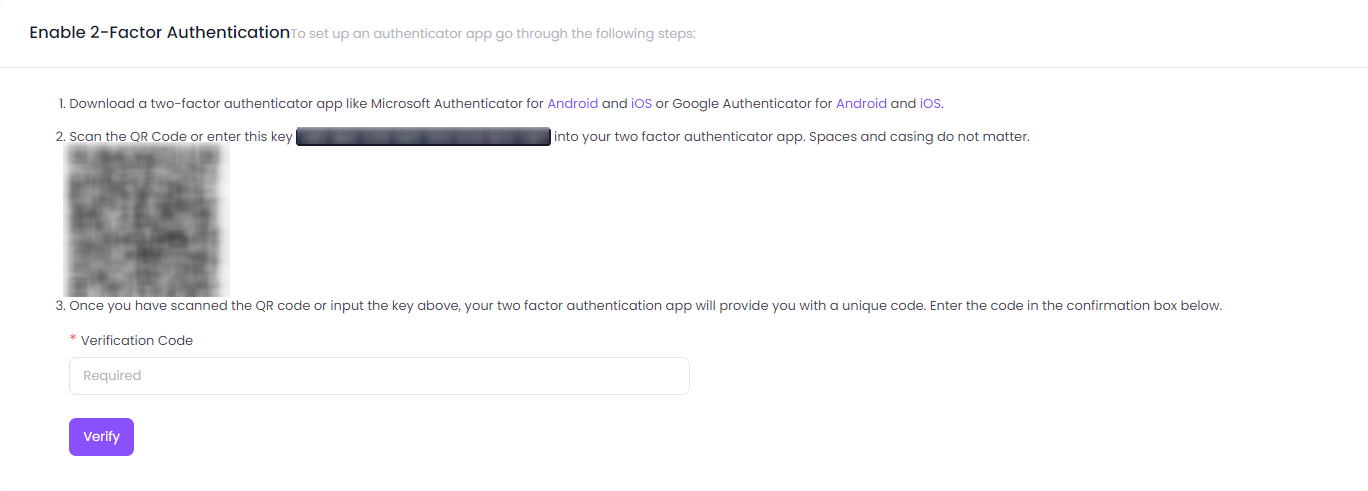
- Enter the 6 digit code from your app into Kotahi.
If you have any issues setting up or using 2FA please refer to your internal IT Support in the first instance.
Recovery codes
Following this, you will be shown a set of recovery codes.
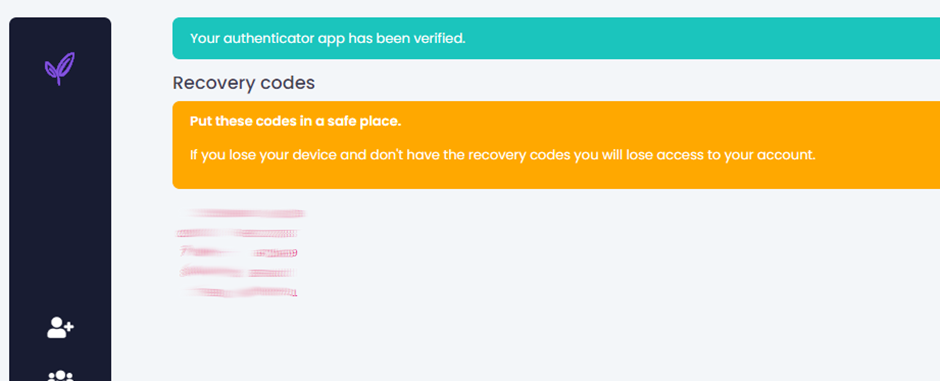
These are meant to be used ONLY in an emergency situation - for example, if you have lost your phone and have no way to authenticate with 2FA as usual. These should therefore be stored somewhere safe you could access if needed.
Store the codes as text in a document rather than as a screenshot. This will make them easier to copy and paste when needed.
That's it!
Congratulations! You're all set to start using Kotahi 🥳